Server-to-Server Signed Requests
This section explains the process of sending signed requests between servers,
particularly in scenarios where additional information needs to be validated
during the interaction. The approach outlined here is designed for situations
where a trusted third-party server communicates with Gaijin’s authorization
servers, allowing the secure exchange of data that is trusted by the Gaijin
system. Each request includes a request signature in the Signature
HTTP header to verify its integrity and authenticity.
The following guidelines describe how to include supplementary information, such
as user details, in requests to ensure they are validated correctly. For
clarity, an example request will be provided using the
login.gaijin.net/login.php endpoint.
Prerequisites
The project must be connected via Gaijin Central (https://central-admin.gaijin.net/).
An API key must be generated to make the request:
Navigate to the Applications section.
Select the application from which the request will be made.
Select the API Keys tab.
Generate the API key (this key will be needed for signature generation).
Additionally, the application ID associated with the generated API key will be required.
Adding IP Address
Since only the request itself is signed, any additional information that requires validation must be included either in the query string of the request or in its payload, depending on the request type.
For example, when passing the user’s IP address along with the login and password, the request would look like this:
POST https://auth.gaijinent.com/login.php
Content-Type: application/x-www-form-urlencoded
Application-ID: 50009
Signature: 0102000000006400e948d2079a6c4febd54a05315f8638db824a7637.....

login=example.user%40email.com&password=1234567890&ip=8.8.8.8
Alternatively, the same request using a curl command:
curl -H "Application-ID: 50009" \
     -H "Signature: 0102000000006400e948d2079a6c4febd54a05315f8638db824a7637....." \
     -d "login=example.user@email.com" \
     -d "password=1234567890" \
     -d "ip=8.8.8.8" \
     https://auth.gaijinent.com/login.php
Generating Signature
The signature is transmitted as a byte array encoded in Base64 URL Encoding (RFC 4648).
Binary Format of Signature
0000-0000:
0x01– Version (currently, version 1)0001-0001:
0x02– Encryption method used (1– SHA256;2– SHA512)0002-0009:
int64UNIX timestamp in Big Endian format000A-FFFF: HMAC signature
Example of a signature for the provided input data:
Version = 1
Encryption Method = 2
Timestamp = 1677781320 (2023-03-02 18:22:00 +0000 UTC)
The HEX representation of the signature header (the header takes the first 10 bytes) is as follows:
0102000000006400e948d2079a6c4febd54a05315f8638db824a7637.....
Signature Generation Algorithm
Pseudo-code:
header= create the header as described above (a 10-byte array)data=header+Method+Endpoint[?Query String]+Payloadsign=header+HMAC(data, method), where the method is selected based on the headerHTTP Header = “Signature: “ + Base64URL(
sign)
The resulting signature header must be added to the request.
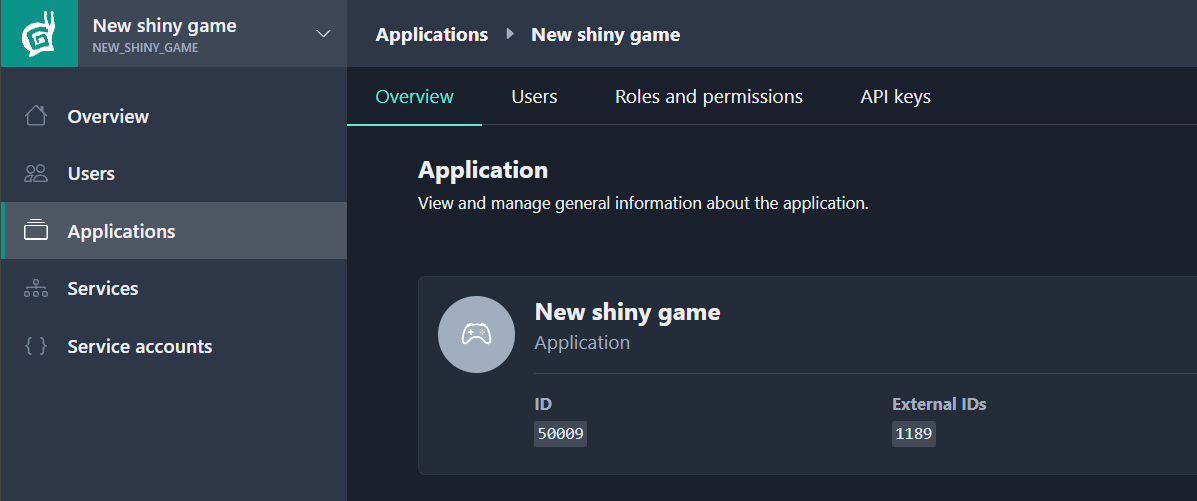
Passing Application ID
To ensure the server selects the correct secret key, it is necessary to specify which application is making the current request.
This is done by including the following required header in the request:
Application-ID: <numeric application ID>
The application ID can be found on the Overview page of the respective application:
Response to Signed Requests
The response format depends on the request itself. A signed request will have the same response format as an unsigned one.
For example, in the case of a signature error with the login.php request, the
response would be:
{
  "status": "ERROR",
  "error": "Invalid signature"
}
Note
If the request cannot be made correctly after thorough checks, please contact Gaijin support. For security reasons, detailed error information will not be provided in the response.