Roles and Permissions
Roles and Permissions define access levels and control user actions within the Gaijin Application Platform (GAP).
Overview
In GAP, you create a project and an application within it. Game developers use the application to define a system of permissions for the application itself, its services, service accounts, and the Central application.
The permissions system consists of individual permissions that control specific user actions and roles that group permissions together. For example, to enable “shooting” and “running” in a game, a user needs a role that includes the corresponding permissions for “shoot” and “run”.
A permission is an atomic unit of access that grants a user the ability to perform a specific action.
A role is a set of permissions assigned to a user, granting them the necessary access rights to perform required actions within the application.
Permissions
Permissions, as fundamental access units, are defined by developers at the application level. Each application uses a permissions and roles system to control user actions within a project.
For example, an application might allow a user to download games or view a player’s inventory. It could also enable a developer to upload a specific game version to designated servers and make it available to users.
In such cases, both the user uploading the game and the one downloading it must have the relevant permissions. If an application receives a request for an action that the user lacks permission for, it will generate an “access denied” response.
Roles
A role is a predefined set of permissions assigned to users. A user can have multiple roles, each defining specific access rights and enabling them to perform the necessary actions within an application.
An application developer or a user with administrative privileges can create roles by grouping permissions into predefined sets tailored to different user requirements.
For example:
Uploader role: Grants the ability to upload data to the system but does not allow setting tags.
Publisher role: Manages application versions and sets tags to facilitate game downloads.
See also
For more information about how to create roles and permissions, see Roles and Permissions Management.
Application Schema
To implement a structured permissions system, an application developer creates the application schema.
Once the schema is established, developers can assign roles to users, determining their access levels. This ensures controlled and flexible user management.
See also
For more information about how to create an application schema, see Add Application Schema.
Developers can share the application schema with others, allowing them to adopt the same permissions structure in their projects.
GAP represents the application schema as a table where:
The first column lists permissions.
The first row lists roles.
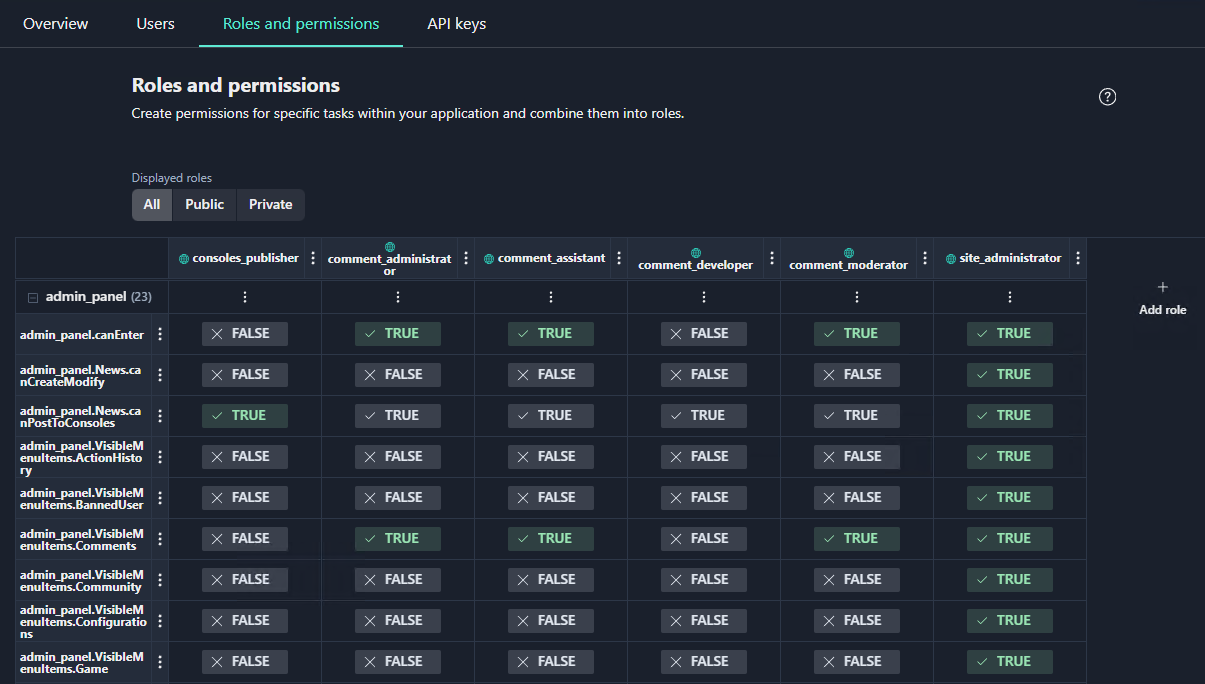
A developer can manually modify role permissions within the Roles and
Permissions table by toggling the values (TRUE/FALSE) in the corresponding
cells.
Public and Private Roles
Roles in GAP are categorized into two types: public and private.
Public roles are assigned at the project level and available to all users with project access (indicated by a blue symbol). Users connecting the application as a service can assign public roles.
Private roles are assigned within the application scope and restricted to specific users performing administrative or service-related tasks, such as managers and support personnel. Private roles are assigned by the application developer.
Note
Public roles apply only when the application functions as a service.
Assign Multiple Roles
Roles are designed around specific business tasks and can include multiple permissions.
Since users can have multiple roles, there is no need to create overly complex role definitions. Instead, create modular roles that complement each other, allowing administrators to flexibly adjust permissions as needed.
For example, if a moderator role is assigned to multiple users and later
requires the ability to ban players, simply adding the user.ban permission to
the moderator role will grant this ability to all assigned users.
Temporary Roles
Developers may need to assign roles on a temporary basis, limiting their duration.
A common use case for temporary roles is revoking default permissions after a set period.
For example, all users might initially have the play_true permission, allowing
them to play the game. However, a specific role could be assigned to certain
users that removes this permission after a specified time. This approach enables
dynamic control over user access.