Logging
In Central every significant action performed by the user is recorded in the event log.
This means that any action that has an impact on the system or application, such as modifying access rights in the application, creating a new API key or service account, is logged and stored for future reference. It is designed to help administrators monitor and analyze user behavior and ensure compliance with security policies.
On the most important pages of Central there are Latest activity block with a table of 30 recent changes. At the bottom of the table there is a Show more button for going to a more detailed log page.
Log Events
The Last Activity block contains lines of change entries.
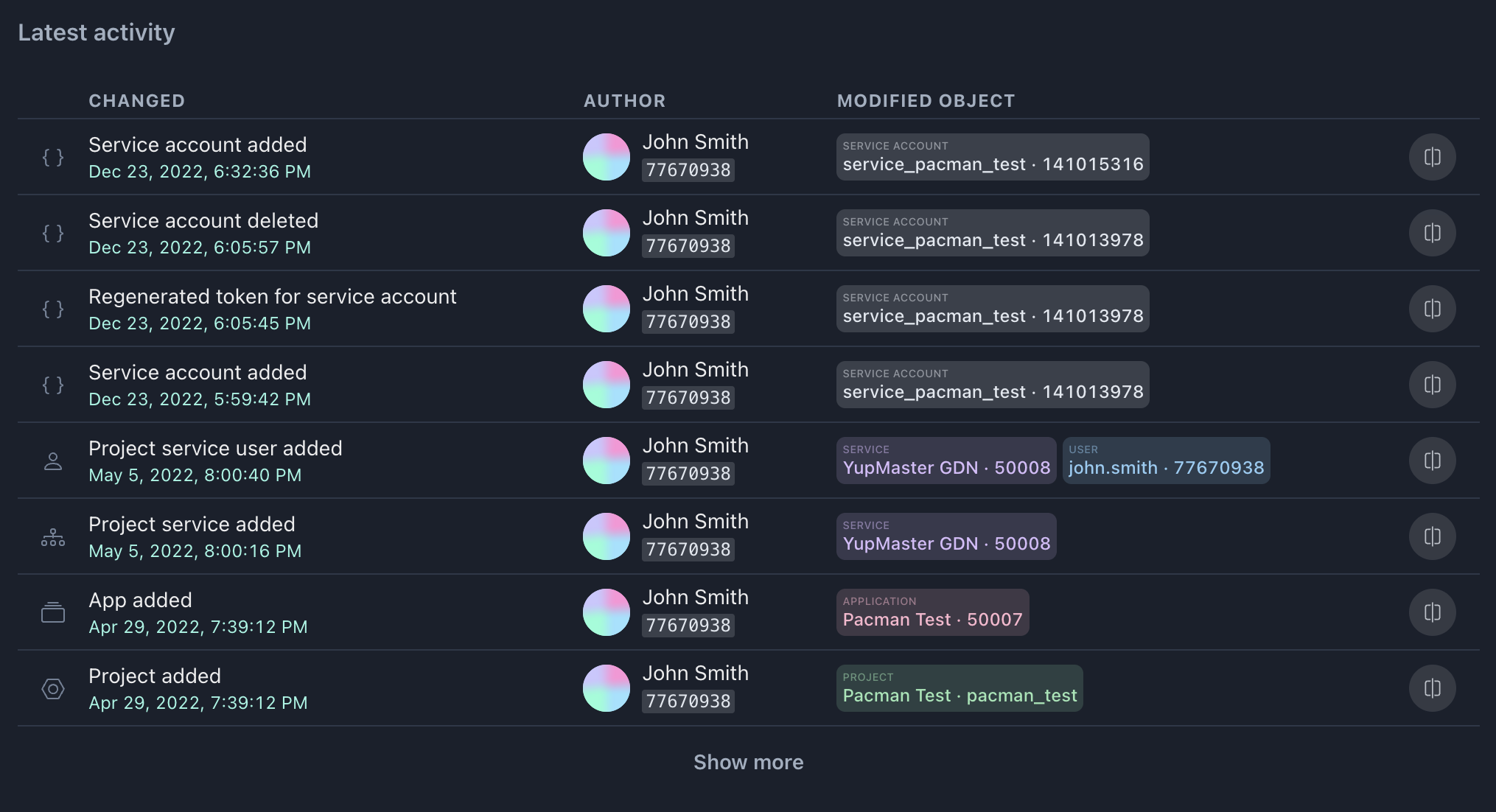
Within each entry, the data is organized in three columns:
CHANGED: the subject of the change, a text description of the event, as well as the date and time,
AUTHOR: information about the user who made the changes,
MODIFIED OBJECT: list of entities that have been changed or belong to the change object. Entity types: Project, Application, Service, User, Role, Permission, Service account, API key. Change objects contain information such as a name or ID.
Diff Editor
The Show difference button opens a dialog box with the editor, where the state before and after changes is compared side by side.

This Diff editor dialog box allows you to compare data before and after changes side by side. The read-only editor inside of it displays the differences in an easy-to-read format, highlighting the changes in color-coded text.